Instrument Tuner
- 4.4
- Rating
- 1.00M
- Installs
- Free
- Price
 Analysis by App-foxy
When I pick up an instrument to practice, the first thing I want is a dependable reference for pitch. That is the entire reason I tried Instrument Tuner, a free music and audio app from TarrySoft. Its focus is refreshingly narrow: help me tune an instrument without turning the process into a complicated music lesson, recording suite, or crowded practice platform.
That narrow purpose is also its main strength. I am not opening it to browse songs or build arrangements. I open it when a guitar, ukulele, violin, or another instrument sounds slightly wrong and I need a practical answer before I continue. The app has a 4.4 average from around 18 thousand ratings, and it has passed one million installs, which suggests that its straightforward approach appeals to a broad group of musicians.
It is free to install, rated for Everyone, and runs on Android 5.0 or later. The current version is 1.18.2.0. Optional in-app purchases range from $0.99 to $99.99 per item, so I would still check the purchase screen carefully if I wanted anything beyond the basic free experience. For the central task of checking pitch, though, the app presents itself as a simple tool rather than a subscription-heavy practice environment.
You May Also Like

 Blood Strike: 2.5 Anniversary
Blood Strike’s Loadouts Turn Every Drop Into a Tactical Gamble
A close look at Blood Strike’s custom loadouts: how fast access to signature weapons reshapes its battle royale rhythm, rewards preparation, and narrows the gap between fights.

 Pandora - Music & Podcasts
Pandora’s Music Is Easy to Start, but Harder to Recover
Pandora’s strength is its low-effort path from a seed to a station. Its weak spot is how much confidence it asks you to place in connection, setup, and quiet recovery.

 8 Ball Pool
 Is Built on Rivalries, Rematches, and Routine
A close look at the rivalries, rematches, shared routines, and unanswered safety questions that turn a quick pool match into a persistent mobile community.

 Samsung Music
’s Quiet Strength Is Playing What You Already Own
Its reach comes less from spectacle than from dependable access to a personal library. That simplicity is both the app’s strongest retention engine and its ceiling.

 AccuWeather: Weather Radar
AccuWeather Review: A Quick, Clear Forecast for Everyday Decisions
For everyday plans, the best forecast is the one you can understand quickly. AccuWeather makes rain timing, radar, and local conditions easy to act on, with a few trade-offs.

 Hill Climb Racing
Why Hill Climb Racing Still Turns Crashes Into One More Run
A tiny car, a bumpy hill and one more upgrade: Hill Climb Racing keeps resurfacing because its simple chaos makes every near-miss feel personal.
More From Our News Desk



Why the tuning capability matters more than extra features
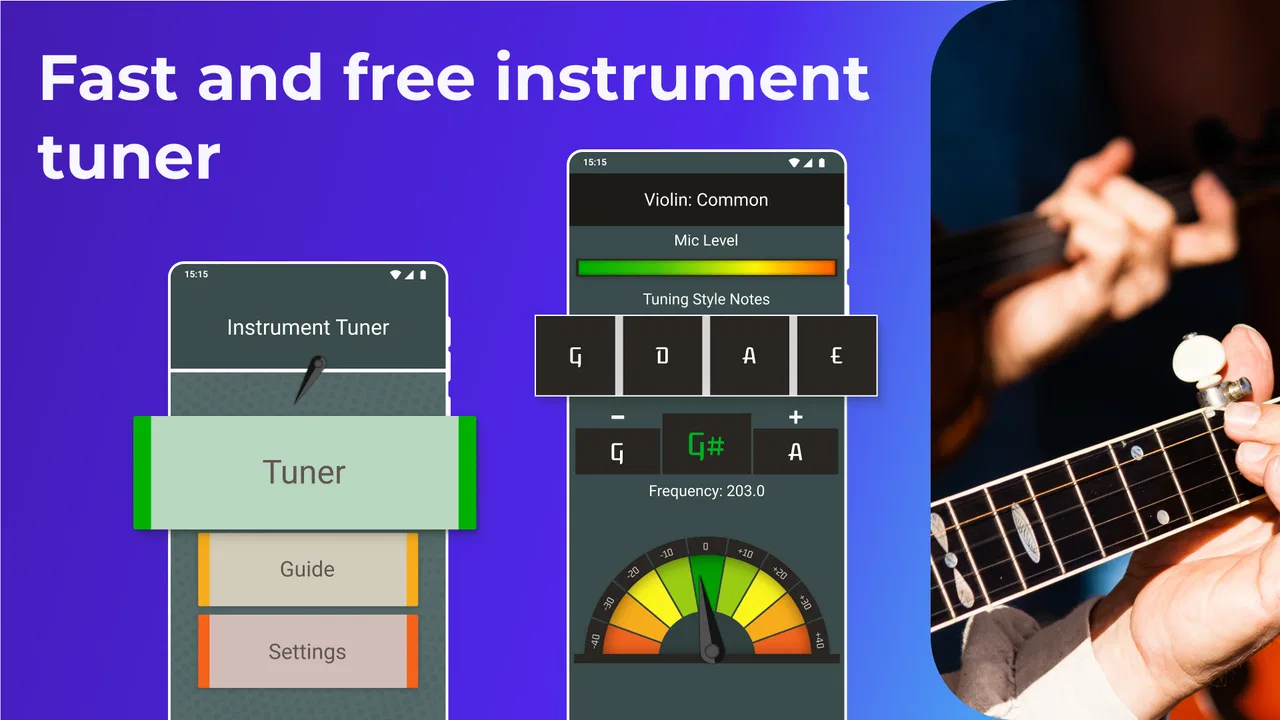
The important capability here is accurate instrument tuning through the phone. That sounds basic, but it changes the way I practice. A string that is only a little sharp or flat can make chords feel unpleasant, make a beginner think their fingers are in the wrong place, or make ensemble playing sound uneven. A tuner gives me an objective reference instead of asking me to trust my ear before my ear is trained enough to do the job.
I especially like this kind of focused tool for short sessions. If I have ten minutes before leaving home, I do not want to navigate through lessons or search for a suitable reference tone. I want to open the tuner, play a string, watch the response, and make a small adjustment. That direct path is more useful to me than a larger app that technically includes tuning but hides it among several other functions.
The app’s identity as an instrument tuner also makes it approachable for people who are still learning. Beginners often worry that tuning requires specialist knowledge. In practice, the phone becomes a visual guide: play one note, observe whether the pitch is too high or too low, adjust carefully, and repeat. I still need to know which string or note I am targeting, but I do not need advanced musical theory to begin.
For experienced players, the benefit is different. I can already hear when something is off, but hearing a problem and correcting it efficiently are not always the same thing. In a noisy room, after changing strings, or when moving between instruments, a visual tuner saves time. It also helps me avoid overcorrecting based on a quick impression from my ears.
What I do before trusting the reading
A phone tuner is only as useful as the sound reaching the phone. I get more consistent results when I place the device reasonably close to the instrument and reduce nearby noise. I also avoid touching or muting the string immediately after playing it, because the app needs a clear sound to interpret. These are simple habits, but they matter more than endlessly tapping the screen.
My preferred workflow is to tune each string slowly rather than making large adjustments. I play the string, watch the indicator settle, make a small change, and play it again. After reaching the target, I check the string once more because changing the tension of one string can slightly affect the others, especially on instruments where the strings share a bridge or neck tension.
That last check is one of the most useful practical lessons with any tuner: a single pass is not always enough. I normally go through the strings once, then repeat the first few. This is particularly worthwhile after installing new strings, when the instrument is still settling, or when I have made a noticeable correction.
How the app fits into an everyday practice routine
Imagine I am preparing for an evening guitar session. The instrument has been sitting in a case, the room temperature has changed, and the first chord sounds slightly uncomfortable. Instead of beginning with exercises and wondering why everything feels wrong, I open Instrument Tuner and check the strings. Within a short routine, I can separate an instrument problem from a playing problem.
That distinction is valuable. If the tuner shows that the strings are close to their targets, I can concentrate on finger placement, pressure, or rhythm. If one string is clearly off, I can correct it before wasting practice time. The app therefore acts less like a destination and more like a quick preparation step that improves everything I do afterward.
I also find it useful before recording a simple idea on a phone. A recording can make pitch problems more obvious, but by then the take is already finished. Tuning first means I am not blaming the microphone or replaying the same passage when the real issue is an instrument that started out of tune.
For a shared household, the app can be handy because it does not require a dedicated tuner for every instrument. One phone can help with occasional checks on a guitar, a ukulele, or another compatible instrument. That does not make it a replacement for every specialist setup, but it lowers the barrier to keeping instruments playable day to day.
The best situation for this particular app
I think Instrument Tuner makes the most sense for someone who wants a fast, uncomplicated check before practice. It suits a beginner buying a first instrument, a casual player who tunes only when necessary, and a more regular musician who wants a backup tuner on a phone. The free entry point is important here: I can try the basic workflow without buying a separate device first.
It is also a good fit when portability matters. A physical tuner can be excellent, but it is another object to remember, charge, or pack. A phone is usually already nearby. If I am visiting a friend, attending an informal rehearsal, or taking an instrument outside the house, having a tuner app available is convenient.
The strongest use case is not a quiet studio with carefully controlled conditions. In that setting, a dedicated tuner may offer a more specialized experience. The stronger case for this app is ordinary life: a string breaks before practice, an instrument comes out of storage, or a beginner needs help deciding whether the sound is close enough to start playing.
There is also a useful teaching angle. I would let a new player make the adjustment themselves while I explain what sharp and flat mean. The app gives them a visible response, but they still have to listen, turn the tuning mechanism, and learn how small changes affect pitch. That makes it more educational than simply handing them an already tuned instrument.
Where the phone-based approach has limits
My main reservation is shared by most microphone-based tuners: surrounding sound can interfere with the reading. Conversation, television, traffic, or another instrument playing nearby can make the result less stable. In those conditions, I would move somewhere quieter before deciding that the app is inaccurate.
The phone itself can also be awkward. If I am adjusting a tuning peg while holding the instrument, I need to position the device where I can see it without knocking it over. A clip-on tuner attached directly to an instrument can be easier during a loud rehearsal, because it senses vibration rather than relying on sound traveling through the room.
That does not make the app a poor choice; it defines the trade-off. Instrument Tuner is convenient and inexpensive to try, while a dedicated tuner can be more comfortable for repeated stage use or difficult acoustic environments. I would choose the app for home practice and travel, but I would consider hardware for performances where speed, visibility, and resistance to background noise matter more.
Another limitation is that a tuner can encourage people to watch the screen too closely. I do not want to chase a perfectly centered indicator while ignoring how the instrument actually sounds. The best approach is to use the visual reading as guidance, then listen to the result and check the instrument in the musical context where it will be played.
Players who need advanced tuning systems, detailed temperament controls, or deep instrument-specific setup tools may prefer a specialist alternative. The appeal here is simplicity, so someone looking for a complete maintenance or practice workstation may find the app too focused. I would not install it expecting lessons, recording production, or a library of musical content.
Small habits that make the tuner more useful
First, I tune in the same order whenever possible. A consistent sequence makes it easier to notice whether one string keeps drifting and prevents me from forgetting a string halfway through. The exact order matters less than building a repeatable routine that I can follow without thinking.
Second, I play one clear note at a time. Strumming several strings together may be musically useful, but it makes it harder to identify which pitch the app is reading. Isolating the string gives me a cleaner result and makes each adjustment more deliberate.
Third, I check again after playing for a few minutes. This is especially helpful with fresh strings or an instrument that has moved between different temperatures. A tuner is not just for the first thirty seconds of practice; it can also show whether the instrument remains stable.
Fourth, I use the app as a starting point for ear training rather than a substitute for listening. I can play a note, look at the reading, and then pay attention to the sound of being close, sharp, or flat. Over time, that combination helps me become less dependent on the screen while still having a reliable reference when I need one.
Finally, I keep expectations realistic. The app can tell me about pitch, but it cannot fix a damaged string, a loose tuning peg, poor intonation, or a mechanical problem. If a string reads correctly in one position but sounds wrong higher up the neck, that is an instrument setup issue rather than something a basic tuner can solve.
Who will appreciate it most
Beginners gain the clearest immediate benefit because the app removes much of the guesswork from the first step of playing. Someone learning guitar or another instrument can use it before every session and gradually connect the visual response with what correct pitch sounds like.
Casual musicians are another strong audience. If I play only occasionally, buying specialized equipment may feel unnecessary, yet starting with an out-of-tune instrument makes those short sessions less enjoyable. A free app on a phone is a sensible middle ground.
Teachers and experienced players may also keep it as a backup. I would not rely on a phone alone for every professional situation, but it is useful when a dedicated tuner is unavailable or when I need to check an instrument quickly for a student or friend.
On the other hand, I would steer away from it if my priority is stage-ready operation in a loud environment, advanced tuning customization, or a full music practice suite. In those cases, a dedicated hardware tuner or a more specialized app may be a better match. The question is not whether Instrument Tuner can do everything; it is whether its focused pitch-checking workflow covers the way I actually play.
My assessment after using it as a daily utility
What I like most is the lack of distraction. The app addresses a small but important problem and fits naturally before practice, rehearsal, or recording. TarrySoft has positioned it as a practical music tool rather than something I need to spend time learning before it becomes useful.
The free price makes experimentation easy, while the Everyone rating broadens its appeal to families and younger learners. I would still pay attention to optional purchases, particularly because the listed items range from less than a dollar to amounts close to one hundred dollars. That range makes it sensible to understand what is included before confirming anything.
Its long availability, beginning in September 2015, and the current version show that it is an established app rather than a brand-new experiment. The important point for me, though, is not its age or install count. It is whether I can open it when an instrument sounds wrong and get useful guidance without unnecessary setup. In that role, it succeeds.
My recommendation is simple: choose Instrument Tuner if you want a focused, accessible way to check pitch before playing. Keep the room reasonably quiet, play individual strings clearly, make small adjustments, and repeat the check after the instrument settles. If you need advanced controls or dependable performance in noisy live settings, look toward dedicated hardware instead. For everyday home practice, learning, travel, and quick checks, this app earns a place on my phone because it solves one problem directly and helps me spend more time making music.
FAQs for Instrument Tuner
01What is Instrument Tuner and what instruments does it support?
Instrument Tuner is a mobile tuning app designed to help musicians tune instruments quickly using the microphone on an Android or iOS device. It is generally suitable for guitar, bass, ukulele, violin, viola, cello, and other string instruments. Depending on the version, it may include standard tuning presets, chromatic tuning, and alternative tunings. Always check the available instrument list before downloading if you need support for a less common instrument.
02How accurate is Instrument Tuner for everyday practice and performance?
During testing, Instrument Tuner was useful for regular practice, rehearsals, and basic setup because it detects the pitch of a played note and shows whether it is sharp, flat, or in tune. Accuracy can depend on microphone quality, background noise, room acoustics, and how clearly the note is played. It is reliable for most casual musicians, although professional performers may still prefer a dedicated hardware tuner for critical stage or studio work.
03Does Instrument Tuner work without an internet connection?
In most cases, the core tuning function works offline because the app analyzes sound directly through the device microphone. This makes it convenient for practicing at home, in a classroom, or while traveling without mobile data. However, some features may require an internet connection, including advertisements, account services, updates, additional tuning packs, or links to other content. Test the app offline after installation if this feature is important to you.
04Is Instrument Tuner free to download, and are there in-app purchases?
Instrument Tuner may be available as a free download, but the exact business model can vary between Android and iOS versions. The free edition may contain advertisements, limited tuning options, or optional premium upgrades. Before downloading, review the store listing for subscription details, one-time purchases, and trial conditions. If you only need standard tuning, the free tools may be sufficient, but advanced presets or an ad-free experience could require payment.
05What permissions does Instrument Tuner require, and is it safe to use?
The most important permission is microphone access, since the app must listen to your instrument to identify its pitch. It should not need access to contacts, messages, or unrelated personal information for normal tuning. When installing, review the permissions requested by the store version and deny anything that appears unnecessary. Also keep the app updated through Google Play or the App Store, and avoid downloading modified versions from unofficial websites.
Pros
- Accurately tunes guitar
- bass
- ukulele
- violin
- and other instruments.
- Simple interface makes it suitable for beginners and experienced musicians.
- Works quickly with clear visual feedback for precise tuning adjustments.
- Useful chromatic mode supports tuning notes across a wide range.
- Portable alternative to carrying a separate physical tuner.
Cons
- Microphone access is required for reliable instrument detection.
- Background noise can reduce tuning accuracy in busy environments.
- Some advanced features may require a paid upgrade.
- Ads may interrupt the experience in the free version.
- Very low-volume instruments can be difficult for the app to recognize.

Instrument Tuner
Gallery